Netweak Badges

Netweak badges, built for Astro.

[!NOTE] Your Astro website must output to Server-Side Rendering.

Usage

Import component:

import {SmallBadge} from "@sudovanilla/netweak-badges"

Create badge for overall status:

<SmallBadge Page="status.example.org"/>

Create badge for specific service:

<SmallBadge Page="status.example.org" Service="2"/>

To assign it to a specific service, take a look at your JSON response and use the number assigned to the service under services:
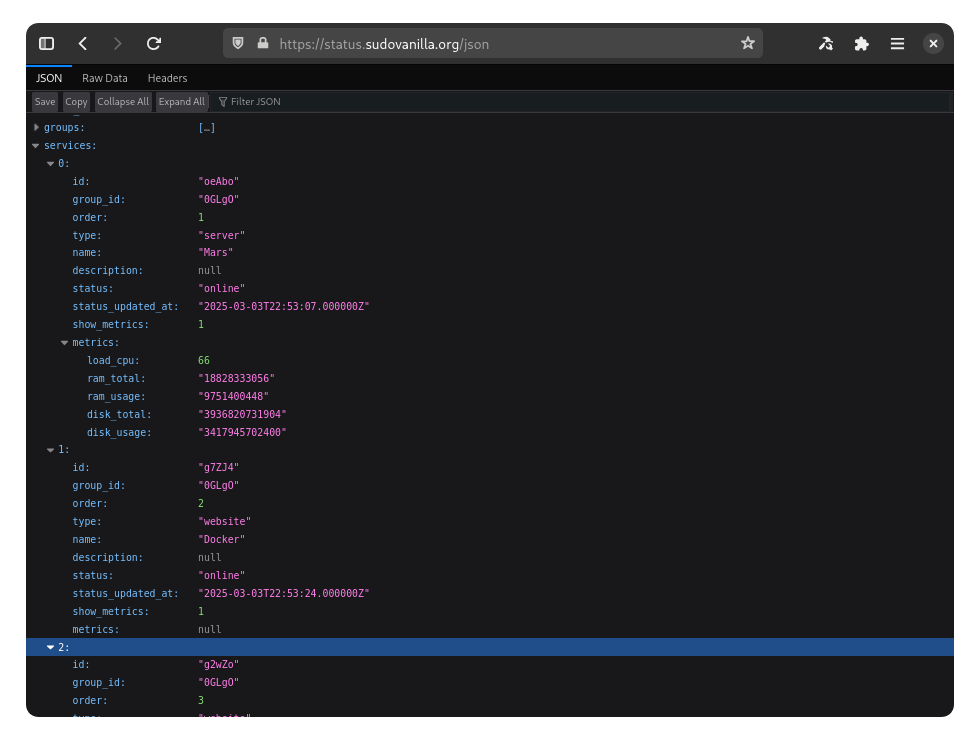
JSON Response

@sudovanilla/netweak-badges - Installation

To install @sudovanilla/netweak-badges via this registry, you'll need to install via the --registry parameter with your package manager.

n

NPM

npm install @sudovanilla/netweak-badges --registry https://js.registry.sudovanilla.org

Learn more about the --registry parameter.

Yarn

yarn config set registry https://js.registry.sudovanilla.org
yarn install @sudovanilla/netweak-badges

Learn more about the config option.

PNPM

pnpm install @sudovanilla/netweak-badges --registry https://js.registry.sudovanilla.org

Learn more about the --registry parameter.

Bun Logo

Bun

bun install @sudovanilla/netweak-badges --registry https://js.registry.sudovanilla.org

Learn more about the --registry parameter.

Learn more about setting this up in your bunfig.toml configuration.


For Deno, add the following to your .npmrc file in your directory:

registry="https://js.registry.sudovanilla.org"

Then run the deno install command.

@sudovanilla/netweak-badges - Download

Download Tarball (v0.0.1)

Integrity sha512-gkwwNLUzY8ZkT74HLrUevwuwGbWE4HtaaTXYngclWC7m7KU7OajUQRaqJ58JTbVxQRoYNYvWTsxvI299sWYuEw==
SHASUM a23993c0794f68924b0d560f0c786d7de1b7c9a3
Tarball https://js.registry.sudovanilla.org/@sudovanilla/netweak-badges/-/netweak-badges-0.0.1.tgz